# Navigationsbereich

<!-- last_modified: 13. Jan 2017 -->
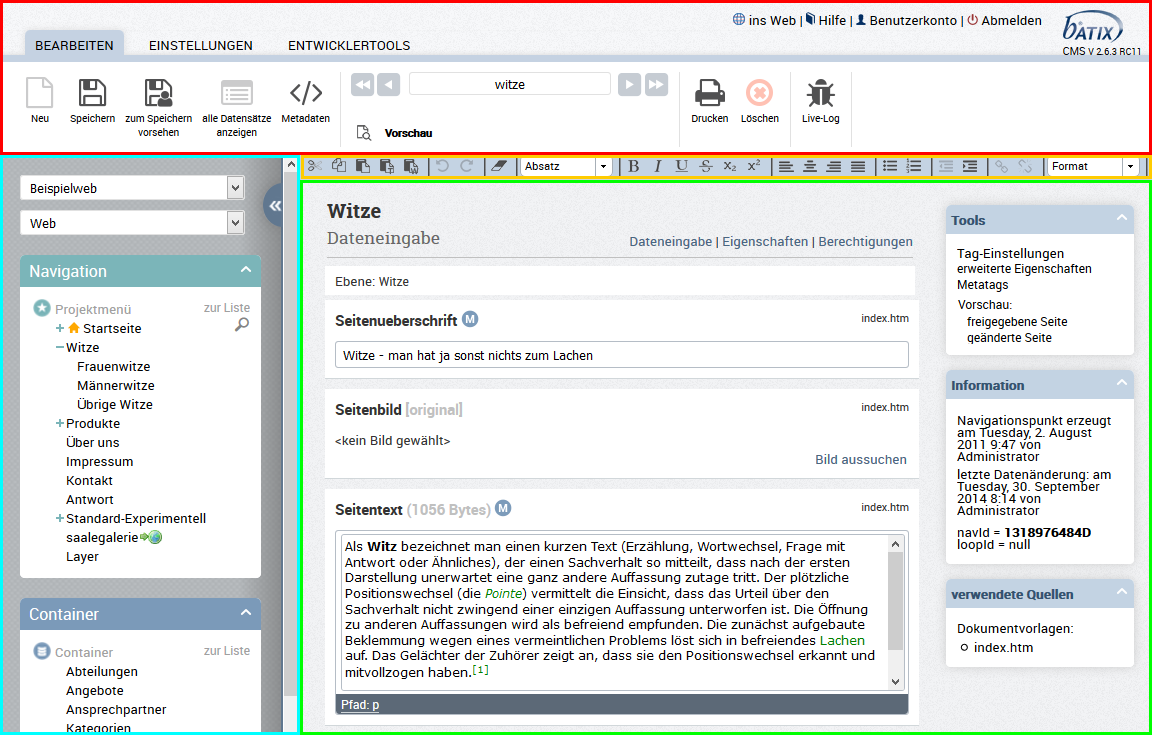
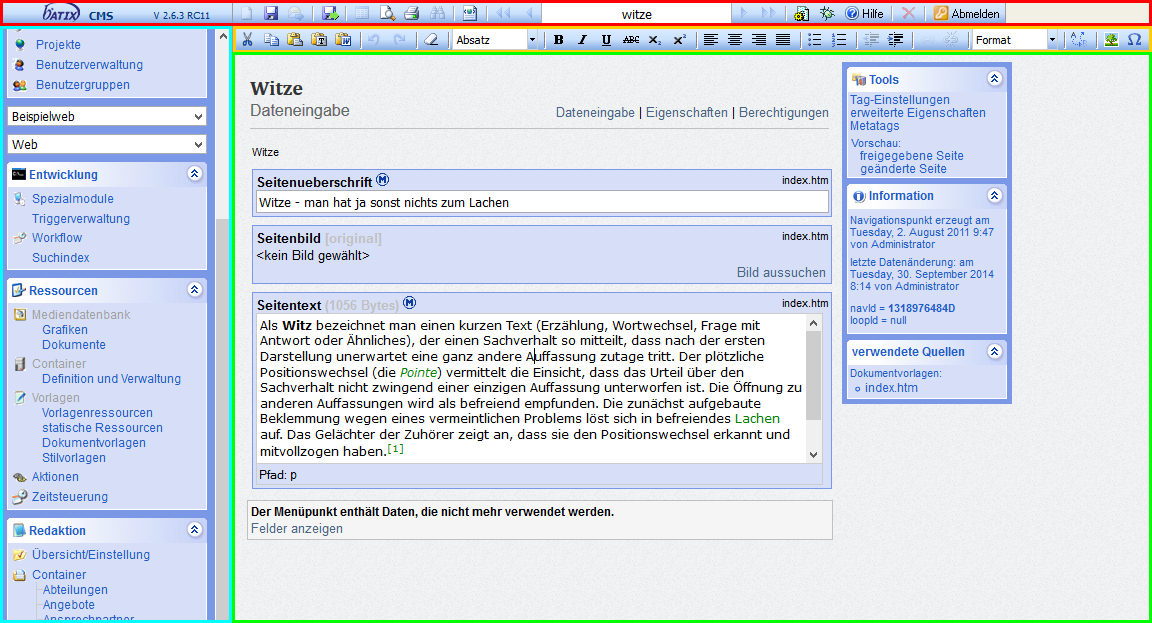
Der Screenshot zeigt die Arbeitsoberfläche im batix® CMS:

**Classic Design:**
![oberflaeche_alt.png](https://batix.help/uploads/images/gallery/2026-05/nZcRdRaQKvAURugt-4489450.png)

**Modern Design:**

![oberflaeche.png](https://batix.help/uploads/images/gallery/2026-05/I1ULHhzjLhFvWLDn-4489448.png)

- **<span style="color: rgb(255,0,0);">rot </span>** markiert: die [Symbolleiste](#bkmrk-symbolleiste)
- <span style="color: rgb(255,204,0);">**gelb **</span> markiert: die [Toolbar](#bkmrk-toolbar)
- **<span style="color: rgb(0,255,255);">blau </span>** markiert: der [Navigationsleiste](#bkmrk-navigationsleiste)
- **<span style="color: rgb(0,255,0);">grün </span>** markiert: der [Arbeitsbereich](#bkmrk-arbeitsbereich)

## Symbolleiste

**Classic Design:**

![Symbolleiste2.png](https://batix.help/uploads/images/gallery/2026-05/1sFXkxQFBytT6UJ4-6225922.png)

**Modern Design:**

![image2015-12-22 9:1:45.png](https://batix.help/uploads/images/gallery/2026-05/MXmjo949VqeclFIb-4489529.png)

| <div style="width:20px"/> | | | |
|--|--|--|--|
| 1 | ![image2017-1-11 9:24:13.png](https://batix.help/uploads/images/gallery/2026-05/tVsDAuHekPJ8Z9XJ-6226138.png) | ![image2017-1-11 7:48:54.png](https://batix.help/uploads/images/gallery/2026-05/0hdlSVHjqVgrjvoU-6226097.png) | **Neuer Datensatz**<br/>Je nach Inhalt im aktuellen Arbeitsbereich dient dieser Button dazu, einen neuen Datensatz (Menüpunkt, Listeneintrag, Container, ...) anzulegen. |
| 2 | ![image2017-1-11 9:23:40.png](https://batix.help/uploads/images/gallery/2026-05/yDDceJb3MiNiOIIU-6226137.png) | ![image2017-1-11 7:49:23.png](https://batix.help/uploads/images/gallery/2026-05/hesD93rTKgSH3Qke-6226099.png) | **Speichern (Veröffentlichen)**<br/>Normalerweise müssen alle Eingaben im Arbeitsbereich mit diesem Button abgeschlossen werden. Verfügt der Benutzer nicht über das Recht der Veröffentlichung, kann er diesen Button nicht benutzen, sondern muss den Button Vormerken benutzen. |
| 3 | ![image2017-1-11 9:27:44.png](https://batix.help/uploads/images/gallery/2026-05/XffcoAoOKGx7X1Ls-6226139.png) |  | **Datensatz an Newsletter senden** <br/>Spezialbutton, der nur in speziell programmierten Projekten zur Verfügung steht |
| 4 | ![image2017-1-11 9:27:54.png](https://batix.help/uploads/images/gallery/2026-05/dcmGefYYCa6E6F3z-6226140.png) | ![image2017-1-11 7:53:40.png](https://batix.help/uploads/images/gallery/2026-05/1jsz2F24rfYaTspV-6226106.png) | **Änderungen vormerken** <br/>siehe 2. |
| 5 | ![image2017-1-11 9:29:31.png](https://batix.help/uploads/images/gallery/2026-05/ZuLEsN99ZehdIkPW-6226143.png) | ![image2017-1-11 9:28:32.png](https://batix.help/uploads/images/gallery/2026-05/iG16PECOeAjYUg6L-6226141.png) | **alle Datensätze listen**<br/>Mit diesem Button gelangen Sie auf allen Seiten im Arbeitsbereich (Listen, Menüpunkte usw.) jeweils eine Ebene höher. |
| 6 | ![image2017-1-11 9:30:2.png](https://batix.help/uploads/images/gallery/2026-05/HifnElaafzs0pRWm-6226144.png) | ![image2017-1-11 7:54:52.png](https://batix.help/uploads/images/gallery/2026-05/rYbiRJAyWKtDx5rI-6226107.png) | **Vorschau**<br/>In einem Extrafenster wird Ihnen, sofern Sie sich im Arbeitsbereich im Ansichtsmodus "Dateneingabe" befinden, ein vorläufige Ansicht der Seite angezeigt. |
| 7 | ![image2017-1-11 9:29:20.png](https://batix.help/uploads/images/gallery/2026-05/RpcWfcT9J1BYlAAl-6226142.png) | ![image2017-1-11 7:51:36.png](https://batix.help/uploads/images/gallery/2026-05/xNU8YBEeqopSxe7V-6226103.png) | **Drucken**<br/>Der Inhalt des Arbeitsbereiches wird entsprechend Ihren Druckereinstellungen ausgedruckt. |
| 8 | ![image2017-1-11 9:32:50.png](https://batix.help/uploads/images/gallery/2026-05/Q3Yvgxi2ITezITPL-6226150.png) |  | **Suchen**<br/>momentan deaktiviert |
| 9 | ![image2017-1-11 9:32:32.png](https://batix.help/uploads/images/gallery/2026-05/oXg4UIsXRzSQu8iP-6226149.png) | ![image2017-1-11 7:51:28.png](https://batix.help/uploads/images/gallery/2026-05/1IxmWrbIZu36Dto3-6226102.png) | **Metadaten**<br/> öffnet in einem Extrafenster die systeminternen Metadaten des aktuellen Menüpunktes |
| 10 | ![image2017-1-11 9:33:19.png](https://batix.help/uploads/images/gallery/2026-05/IhBMhFKCwETbhIBI-6226151.png) ![image2017-1-11 9:33:24.png](https://batix.help/uploads/images/gallery/2026-05/YCF14ZgIt0tHZVtZ-6226152.png) ![image2017-1-11 9:33:28.png](https://batix.help/uploads/images/gallery/2026-05/Zaelfnilw1P308N4-6226153.png) ![image2017-1-11 9:33:32.png](https://batix.help/uploads/images/gallery/2026-05/000gAasrEEG9X4fd-6226154.png) | ![image2017-1-11 7:55:43.png](https://batix.help/uploads/images/gallery/2026-05/B7JnpU0pqp2PLLUn-6226108.png) ![image2017-1-11 7:55:49.png](https://batix.help/uploads/images/gallery/2026-05/YLUzIW1Bd0xvgbeJ-6226109.png) ![image2017-1-11 7:55:54.png](https://batix.help/uploads/images/gallery/2026-05/8ZcAegeskRMo577Q-6226110.png) ![image2017-1-11 7:55:58.png](https://batix.help/uploads/images/gallery/2026-05/86xz6Ir4LFxXRJHQ-6226111.png) | **Blättern zwischen Datensätzen**<br/> Hier können Sie zwischen Datensätzen blättern, falls Sie sich zum Beispiel in einer untergeordneten Listenansicht befinden. Die Anzahl der Datensätze wird Ihnen im Textfeld angezeigt, Sie können um jeweils einen Datensatz blättern (, ) bzw zum Anfang () oder zum Ende () springen. (Falls Sie sich nicht in einer Listenansicht befinden, wird das Textfeld zur Anzeige anderer Informationen benutzt.) |
| 11 | ![image2017-1-11 9:31:49.png](https://batix.help/uploads/images/gallery/2026-05/XhN7tgFa6HoMeNOD-6226148.png) | ![image2017-1-11 7:57:55.png](https://batix.help/uploads/images/gallery/2026-05/H1Db5XuPJhZKdGe9-6226113.png) | **Einstellungen**<br/>Hier gelangen Sie zu den benutzerspezifischen Einstellungen, wie Zugangsdaten oder Sessionlänge. |
| 12 | ![image2017-1-11 9:31:27.png](https://batix.help/uploads/images/gallery/2026-05/h08Bly92AyGS1KuE-6226147.png) | ![image2017-1-11 7:57:21.png](https://batix.help/uploads/images/gallery/2026-05/t5gKyAJhJxPGJvEC-6226112.png) | **Hilfe**<br/>Die Onlinedokumentation öffnet sich in einem neuen Fenster. |
| 13 | ![image2017-1-11 9:31:12.png](https://batix.help/uploads/images/gallery/2026-05/D9tGwFB1K9pz9R7r-6226146.png) | ![image2017-1-11 7:51:56.png](https://batix.help/uploads/images/gallery/2026-05/yxELwaZ6Vm4cwLKB-6226105.png) | **diesen Datensatz löschen**<br/>Hier löschen Sie kontextabhängig den aktuellen Datensatz (Listeneintrag, Containerdatensatz, Menüpunkt, ...) |
| 14 | ![image2017-1-11 9:31:6.png](https://batix.help/uploads/images/gallery/2026-05/HbAh8jybnUvCLr1B-6226145.png) | ![image2017-1-11 7:58:22.png](https://batix.help/uploads/images/gallery/2026-05/Oaf7vMvYeYTdLuyF-6226114.png) | **Arbeiten beenden** <br/>Hier verlassen Sie den Administrationsbereich und gelangen wieder auf die Startseite, die Sie zur Eingabe von Benutzername und Passwort auffordert. Verlassen Sie aus sicherheitsgründen das CMS immer über diesen Button. |
| 15 |  |  | **Versions-Infos**<br/>[Informationen zur aktuellen Version](/books/cms-handbuch-redakteure/page/versions-info) |

## Toolbar

Die Toolbar finden Sie unterhalb der Symbolleiste.Sie erscheint nur, wenn Sie in ein Textfeld klicken und ermöglicht Ihnen das Formatieren von Eingaben im Arbeitsbereich. Die einzelnen Buttons werden kontextabhängig aktiviert. Die Toolbar ist integraler Bestandteil des Texteditors.


![toolbar_alt.png](https://batix.help/uploads/images/gallery/2026-05/HjXS7gipBFx1ue6B-4489462.png)

![image2015-12-22 8:36:59.png](https://batix.help/uploads/images/gallery/2026-05/SZaRc3cXSwVyGBfw-4489522.png)

| <div style="width:54px"/> | | | |
|--|--|--|--|
| 1 | ![Unbenannt-5.jpg](https://batix.help/uploads/images/gallery/2026-05/t3WbycHxo8Ox1Yj7-4489464.jpg) | ![icon18.png](https://batix.help/uploads/images/gallery/2026-05/JLO84A13HylxB4RM-4489493.png) | Markierte Inhalte ausschneiden |
| 2 | ![image2017-1-11 8:18:30.png](https://batix.help/uploads/images/gallery/2026-05/iuxOq0B2L58E4YD2-6226116.png) | ![icon17.png](https://batix.help/uploads/images/gallery/2026-05/fYwe4ZhzbIKkPjsp-4489492.png) | Markierte Inhalte in Zwischenablage kopieren |
| 3 | ![image2017-1-11 8:19:45.png](https://batix.help/uploads/images/gallery/2026-05/qvcdQxcrZ3t0HnUZ-6226118.png) | ![image2015-12-22 8:20:26.png](https://batix.help/uploads/images/gallery/2026-05/Hyz2DyvTijmPSXVe-4489508.png) | Inhalte der Zwischenablage an Curserposition einfügen |
| 4 | ![icon_a_2.png](https://batix.help/uploads/images/gallery/2026-05/6gYaWjVVrJAwEa0D-4489511.png) | ![image2015-12-22 8:16:36.png](https://batix.help/uploads/images/gallery/2026-05/CZ4RSWnMPIWR8NVj-4489503.png) | Als einfachen Text einfügen |
| 5 | ![image2015-12-22 8:28:15.png](https://batix.help/uploads/images/gallery/2026-05/ktnExvbfZooc7Q7A-4489512.png) | ![image2015-12-22 8:16:47.png](https://batix.help/uploads/images/gallery/2026-05/asu6Xv5BHRH79bcG-4489504.png) | Mit Formatierungen aus Word einfügen |
| 6 | ![image2017-1-11 8:21:43.png](https://batix.help/uploads/images/gallery/2026-05/feyn1USD0AXw0Pwj-6226120.png) ![image2017-1-11 8:21:20.png](https://batix.help/uploads/images/gallery/2026-05/iwEcyGw8HioIOCsA-6226119.png) | ![icon14.png](https://batix.help/uploads/images/gallery/2026-05/k8acPEDvLuK5KKQW-4489491.png) ![icon11.png](https://batix.help/uploads/images/gallery/2026-05/QYdBqeQg9qnPXGHE-4489486.png) | Änderungen rückgängig machen bzw. wiederherstellen |
| 7 | ![icon_a_1.png](https://batix.help/uploads/images/gallery/2026-05/V6hyUmjDkinJbklp-4489510.png) | ![icon1.png](https://batix.help/uploads/images/gallery/2026-05/45Ri4CWUx3rlsvP2-4489477.png) | Alle übernommenen Auszeichnungen und Formatierungen löschen |
| 8 |  |  | Markierte Inhalte mit barrierefreien Standardauszeichnungen versehen (Überschriften, Zitate, Hervorhebungen) |
| 9, 10, 11 | ![image2017-1-11 8:23:27.png](https://batix.help/uploads/images/gallery/2026-05/gbXmPzGsKjLoRjhB-6226121.png) ![image2017-1-11 8:25:17.png](https://batix.help/uploads/images/gallery/2026-05/Ul4bS2cYVzZqZxiY-6226124.png) ![image2017-1-11 8:25:22.png](https://batix.help/uploads/images/gallery/2026-05/Ejy92Uzxe0mMeKjT-6226125.png) | ![icon7.png](https://batix.help/uploads/images/gallery/2026-05/ONKVAvK5tsaL9H5A-4489483.png) ![icon9.png](https://batix.help/uploads/images/gallery/2026-05/uwjzCbZPwhEW2zcn-4489482.png) ![image2017-1-11 8:24:16.png](https://batix.help/uploads/images/gallery/2026-05/YbUskpeJ1L5K2Q7g-6226122.png) | Markierte Inhalte <u>f</u>ett, <u>k</u>ursiv oder <u>u</u>nterstichen hervorheben |
| 12 | ![Unbenannt-9.jpg](https://batix.help/uploads/images/gallery/2026-05/iguVd3nIPsXsyp3p-4489468.jpg) | ![image2017-1-11 8:24:23.png](https://batix.help/uploads/images/gallery/2026-05/XqCPlExLTsRY0Yg5-6226123.png) | Markierten Inhalt durchstreichen |
| 13 | ![Unbenannt-6.jpg](https://batix.help/uploads/images/gallery/2026-05/z9G9tBEO4Tu0aA3u-4489465.jpg) | ![icon3.png](https://batix.help/uploads/images/gallery/2026-05/B7vyrggv3aCqjZaF-4489478.png) | Text tiefgestellt |
| 14 | ![Unbenannt-7.jpg](https://batix.help/uploads/images/gallery/2026-05/QZEKPc6ZEA1e7VfC-4489467.jpg) | ![icon4.png](https://batix.help/uploads/images/gallery/2026-05/GvDu57CcCj7JabSP-4489479.png) | Text hochgestellt |
| 15 | ![image2015-12-22 8:32:51.png](https://batix.help/uploads/images/gallery/2026-05/BkamrgaHmjxrxsSd-4489518.png) ![image2015-12-22 8:31:22.png](https://batix.help/uploads/images/gallery/2026-05/gAZiSepoWk2KNUlj-4489517.png) ![image2015-12-22 8:32:58.png](https://batix.help/uploads/images/gallery/2026-05/ejo4fXgwj41Ty54q-4489519.png) ![image2015-12-22 8:31:14.png](https://batix.help/uploads/images/gallery/2026-05/ujzl3Hk2UCtiQmVV-4489516.png) | ![image2015-12-22 8:12:39.png](https://batix.help/uploads/images/gallery/2026-05/jP4kuITW1y3gvL8d-4489497.png) ![image2015-12-22 8:13:27.png](https://batix.help/uploads/images/gallery/2026-05/0RoPWGJkQcNsFCjU-4489500.png) ![icon24.png](https://batix.help/uploads/images/gallery/2026-05/UvEOqYiZkeEEBBUD-4489501.png) ![image2015-12-22 8:13:1.png](https://batix.help/uploads/images/gallery/2026-05/C3WeWKzWA4Ge7pyS-4489499.png) | Markierte Inhalte ausrichten |
| 16 | ![image2017-1-11 8:26:57.png](https://batix.help/uploads/images/gallery/2026-05/SmqupkfFUyFvXpBG-6226126.png) ![image2017-1-11 8:27:12.png](https://batix.help/uploads/images/gallery/2026-05/dubyonRIWBnsLVZp-6226127.png) | ![icon8.png](https://batix.help/uploads/images/gallery/2026-05/taBj63NDHU2SdYnZ-4489484.png) ![icon10.png](https://batix.help/uploads/images/gallery/2026-05/qwjCRbxBJns6r1hN-4489481.png) | Markierte Inhalte als Aufzählung bzw Nummerierung formatieren |
| 17 | ![Unbenannt-2t.jpg](https://batix.help/uploads/images/gallery/2026-05/9vVaH4A62coEEgBd-4489473.jpg) ![Unbenannt-10.jpg](https://batix.help/uploads/images/gallery/2026-05/urzbRqArHoMHpkNL-4489474.jpg) | ![icon25.png](https://batix.help/uploads/images/gallery/2026-05/PVRuXOQUH6fa8eHd-4489507.png) ![image2015-12-22 8:19:32.png](https://batix.help/uploads/images/gallery/2026-05/7jfzyTy45N3i3To3-4489505.png) | Markierten Text ausrücken bzw. einrücken |
| 18 | ![image2017-1-11 8:28:31.png](https://batix.help/uploads/images/gallery/2026-05/1PvTIatLLJ0JjRJb-6226129.png) | ![icon6.png](https://batix.help/uploads/images/gallery/2026-05/gq0B0Wfsnd1rqjYP-4489485.png) | Markierte Inhalte mit einem Link versehen ([weitere Infos](/books/cms-handbuch-redakteure/page/texte)) |
| 19 | ![image2017-1-11 8:28:24.png](https://batix.help/uploads/images/gallery/2026-05/fAtHxapLzjN3YHXB-6226128.png) | ![icon5.png](https://batix.help/uploads/images/gallery/2026-05/doUCMdzq6QJkaqiZ-4489480.png) | Markierte Links löschen |
| 20 | ![Unbendannt-2.jpg](https://batix.help/uploads/images/gallery/2026-05/IXgEJKwFBQH6Bmbv-4489471.jpg) | ![image2015-12-22 8:16:17.png](https://batix.help/uploads/images/gallery/2026-05/rX7W98bmC45g6JVf-4489502.png) | Auf markierten Text Formatierung anwenden |
| 21 | ![image2017-1-11 8:29:41.png](https://batix.help/uploads/images/gallery/2026-05/Oe9L1EFnlVMaGqDb-6226130.png) | ![image2015-12-22 8:9:10.png](https://batix.help/uploads/images/gallery/2026-05/B4M15BkvmEeUHtgW-4489494.png) | Grafik an Cursorposition einfügen |
| 22 | ![Unbwenannt-2.jpg](https://batix.help/uploads/images/gallery/2026-05/D7tmDzxNn21aYzzm-4489472.jpg) | ![icon15.png](https://batix.help/uploads/images/gallery/2026-05/72CU2mk5b4wuwi1l-4489489.png) | Sonderzeichen einfügen, es öffnet sich ein Layer mit Sonderzeichen |
| 23 | ![Unbenanfnt-3.jpg](https://batix.help/uploads/images/gallery/2026-05/gaDKaAxLcTuWFEaJ-4489470.jpg) | ![image2015-12-22 8:27:8.png](https://batix.help/uploads/images/gallery/2026-05/JPbXUK18NWs1o1jh-4489509.png) | Vollbildschirm-Ansicht |
| 24 | ![Udnbenannt-3.jpg](https://batix.help/uploads/images/gallery/2026-05/cLnARUdLXjGDNWmj-4489469.jpg) | ![icon16.png](https://batix.help/uploads/images/gallery/2026-05/Ryr9k37cZKitHYer-4489490.png) | HTML-Quellcode des Textfeldes bearbeiten |

Alle weiteren Formatierungen sind über die Nutzung eines Kontekxtmenüs direkt aus dem Textfeld möglich.**<br/>Alle Änderungen müssen gespeichert werden** **mit** ![image2017-1-11 9:23:40.png](https://batix.help/uploads/images/gallery/2026-05/yDDceJb3MiNiOIIU-6226137.png) bzw. ![image2017-1-11 7:49:23.png](https://batix.help/uploads/images/gallery/2026-05/hesD93rTKgSH3Qke-6226099.png) oder STRG+S (nur im neuen Design)

## Navigationsleiste

| **Classic Design:**<br>![Navigationsbereich.png](https://batix.help/uploads/images/gallery/2026-05/O1NzkIOvSLiT5ulg-6225923.png) | **Modern Design:**<br>![image2015-12-22 9:19:5.png](https://batix.help/uploads/images/gallery/2026-05/rxp4XNz7BtVpRj2m-4489532.png) |
|--|--|
| • Zugriff auf alle Systembereiche über aufklappbare Teilbereiche (z.B. Mandanten, Projekte, Datenbank, Projekt-Menüpunkte)<br/>• kann je nach Rechtevergabe und Benutzereinstellung unterschiedlich aussehen (nicht alle Teilbereiche werden angezeigt, andere Farben) | • Neue Gliederung und Straffung der Navgation<br/>• Teilweise Auslagerung in den Navigations-Bereich (weitere Tabs, die je nach Berechtigung angezeigt werden) |

| <div style="width:70px">Nr. bisheriges Design</div> | <div style="width:70px">Nr. neues Design</div> |  |
|---------------------------|----------------------|--|
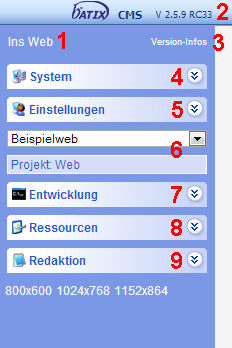
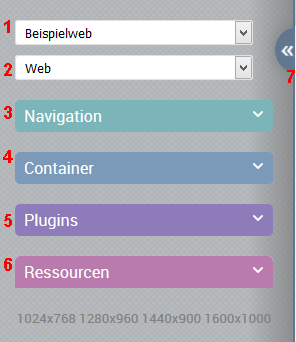
| 1 | ![ins Web](http://cms3.batix.net/verwaltung/control/imageswin8/icon_insweb.png) ins Web<br/>Link befindet sich rechts oben | Ins Web Mit diesem Link gelangen Sie auf die Startseite des momentan gewählten Projektes, dargestellt in einem neuen Tab oder Fenster. Es handelt sich dabei stets um die freigegebene Version der Startseite. Sollten Sie ein Vier-Augen-Prinzip eingeschaltet haben wird die vorgeschlagene Version nicht angezeigt. |
| 2 | Angabe (als Link) befindet sich rechts oben | Hier sehen Sie die Versionsnummer Ihres Systems. |
| 3 |  | siehe Versionsnummer. Mit einem Klick auf diesen Link öffnet sich ein neues Fenster, in dem Sie die in Kurzform dargestellten Änderungen in den letzten Versionen (Neue Features, Bugfixes) einsehen können. (siehe auch Changelog) |
| 4 | Neuer Tab, nur mit speziellen Rechten sichtbar | System Dieser aufklappbare Teilbereich ermöglicht Ihnen den Zugriff auf Systeminformationen, Entwickler-Tools, System-Module, Systemeinstellungen und Benutzereinstellungen. |
| 5 | Neuer Tab | Einstellungen Dieser aufklappbare Teilbereich ermöglicht Ihnen den Zugriff auf Mandanten, Projekte, die Benutzerverwaltung sowie Benutzergruppen. |
| 6 | 1+2 | Auswahl von Mandanten und Projekten Das System ist grundlegend in Mandanten (Kennzeichen: separate Benutzerverwaltung) und Projekte (Kennzeichen: separate Mediendatenbank) untergliedert. Um die folgenden Teilbereiche des Navigationsbereichs nutzen zu können, müssen Sie zunächst einen Mandanten und ggf. danach ein Projekt auswählen, in dem Sie arbeiten möchten. Sie können jederzeit zwischen Mandanten und Projekten wechseln. |
| 7 | Neuer Tab | Entwicklung In diesem aufklappbaren Teilbereich finden Sie projektspezifische Spezialmodule, den Workflow (aktiv bei eingeschaltetem Vier-Augen-Prinzip) sowie den Suchindex. |
| 8 | 6 | Ressourcen - projektspezifischer Zugriff auf Mediendatenbank (Bilder, Dokumente) Container (Definitionen und Verwaltung) Vorlagen (statische Ressourcen, Dokumentvorlagen - HTML, Stilvorlagen - CSS) Aktionen Zeitsteuerung. |
| 9 | 3 + 4 + 5 | Redaktion - projektspezifischer Zugriff auf Übersicht/Einstellungen (Menüstruktur) Container (Datenbank-Inhalte) Projektmenü (redaktionellen Bereich) Plugin-Seiten (nur, wenn eingerichtet, z.B. Newsletter) |
|  | 7 | Funktion zum Ein- bzw. Ausklappen des Navigationsbereiches |

## Arbeitsbereich

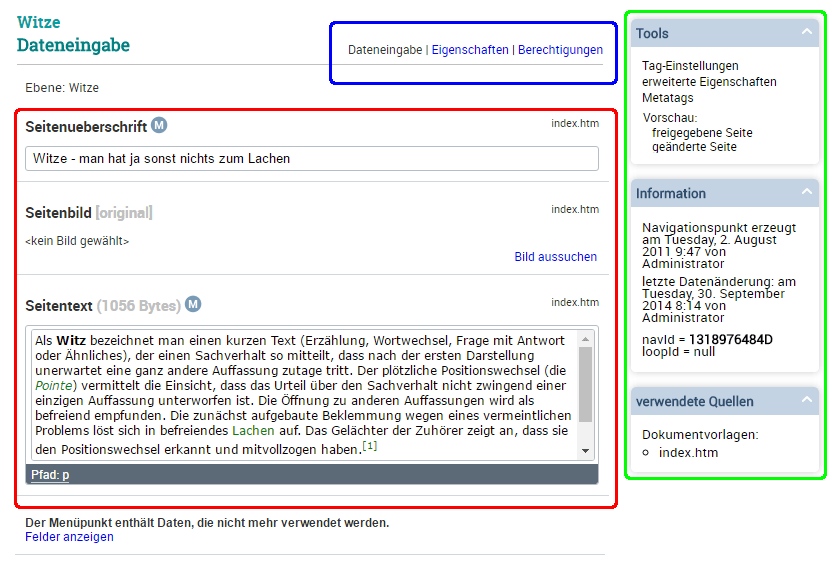
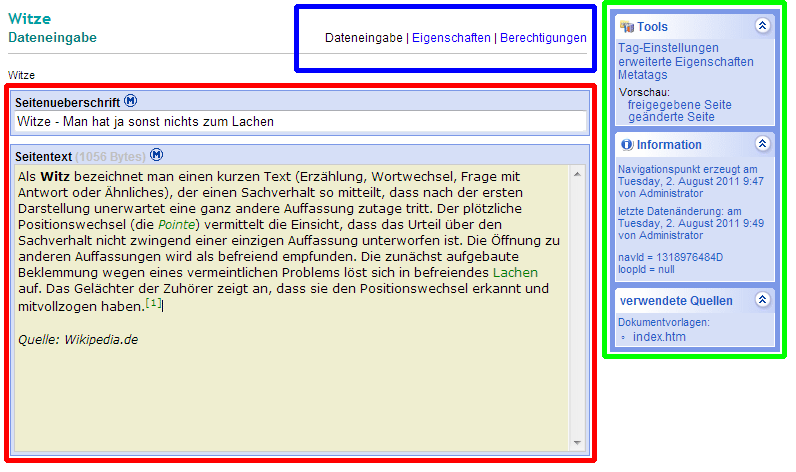
Der Arbeitsbereich verfügt über verschiedene Anzeigemodi (grüner Kasten), bei denen Sie Daten eingeben, Einstellungen vornehmen und assistentgesteuerte Aktionen vornehmen können.

**Classic Design:**
![Arbeitsbereich.png](https://batix.help/uploads/images/gallery/2026-05/7V1kIYoJdd0kkl9v-6225924.png)

**Modern Design:**

![arbeitsbereit_neu.png](https://batix.help/uploads/images/gallery/2026-05/vgK91E3jxbXhRs2O-6225926.png)

<span style="color: rgb(255,0,0);">**Eingabebereich:**</span>

- inhaltliche [Bearbeitung](/books/cms-handbuch-redakteure/page/menupunkt-inhaltspflege) der Daten eines Menüpunktes

<span style="color: rgb(0,255,0);">**Tools:**</span>

- Durchführung assistentengesteuerter Aktionen wie Menüpunkt kopieren oder verschieben
- Infos zum Menüpunkt

<span style="color: rgb(0,0,255);">**Auswahl Anzeigemodus:**</span>

- Dateneingabe - inhaltliche Bearbeitung der Daten eines Menüpunktes
- Eigenschaften - grundlegende Einstellungen für den Menüpunkt
- Berechtigungen - detaillierte Einstellung der Berechtigungen von Benutzern und Benutzergruppen für den Menüpunkt